


Clear services. Real project proof. Easier quote enquiries.
Websites for Contractors and Trades in Ireland
Services, work areas, completed projects and contact steps are organised so customers can understand the business before they enquire.
Website design for builders, trades, home improvement companies and specialist contractors that depend on calls and quote requests.
Site Launch

CONTRACTOR WEBSITE DESIGN IRELAND
Customers arrive with four practical questions
They are not looking for clever design. They want to know whether you do the work, cover their area, can prove it and make quoting simple.
WHAT THE WEBSITE MUST SHOW

A clear contractor website answers all four before the customers needs to call.

04
How do I request a quote?
the next step
Simple call or enquiry route

03
Have you done similar work?
the proof
Projects, photos and reviews

02
Do you work where I live?
THE AREA
Clear counties and locations

01
Do you handle the job I need?
the service
Dedicated service pages
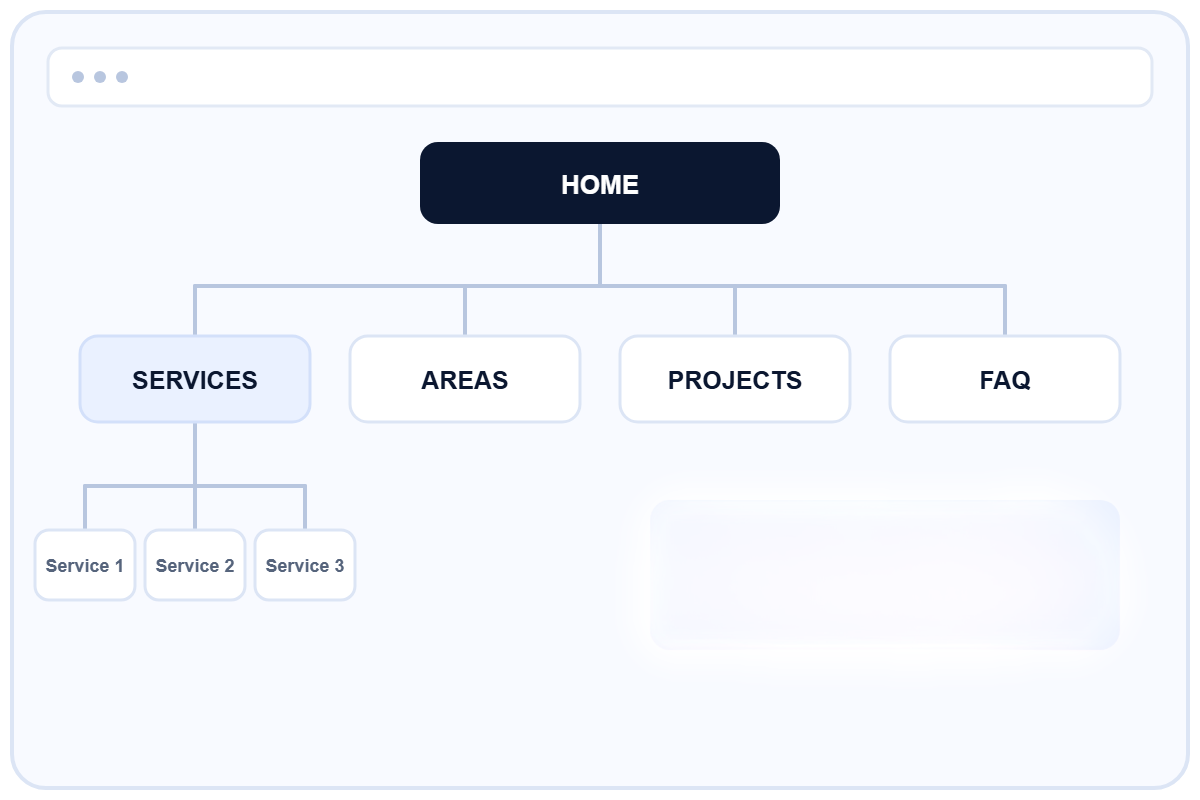
The site is organised around services, locations and proof
A single Services page is rarely enough. Important work needs its own clear page, supported by project examples, service areas and useful answers.
WHAT THIS FIXES
BUILT AROUND THE CUSTOMER JOURNEY

New content can be added later
Google understand each service clearly
Customers can find the right job quickly
Services are not buried in one paragraph
every page leads to
Call, message or quote request
Useful before it is impressive
The design supports the work. It should make the business clearer, easier to trust and easier to contact on a phone.
WHAT THE WEBSITE NEEDS TO DO
PROJECT PROOF
03
Use real work, not claims
Photos, reviews and completed jobs prove more than reliable and professional.
SERVICE AREAS
02
Show where the team works
Counties, towns and realistic coverage are visible without thin duplicate pages.
SEARCH STRUCTURE
06
Create a base for growth
Clear headings, pages and internal links help Google understand the business.
MOBILE USE
05
Work properly on a phone
Readable text, simple navigation and visible call or message buttons.
QUOTE ROUTE
04
Make enquiries practical
Ask for the details and photos needed to understand the job before calling back.
SERVICE CLARITY
01
Explain each main service
Separate pages give enough room for the work, process, cost factors and FAQs.
For established contractors and trades
The structure is adapted to the actual enquiry process, not forced into one template.
BUILT FOR PRACTICAL SERVICE BUSINESSES
The business must already have a real service, real customers and work worth showing.
S
Services customers need explained
Specialist contractors
E
Local service and maintenance
Electrical & plumbing
H
Urgent and planned work
Heating & oil services
L
Visual project-based services
Landscaping teams
R
Repair, replacement and call-outs
Roofing contractors
B
Multi-service project work
Builders & renovations
A practical website built around real homeowner questions
REAL CONTRACTOR PROJECT
From a weak website to a structured service platform
The site was rebuilt around tank replacement, relocation, removal, service areas, recent work and a photo-based quote process.
Top visibility for main service searches across Leinster.
SEARCH RESULT
OILTANKREPLACEMENT.IE
QUOTE FLOW
LOCAL SEO
SERVICE PAGES

Planned before it is designed
The work starts with the service and enquiry process, not colours or templates.
HOW THE PROJECT WORKS
You work directly with one person from the first discussion to launch.
Connect & test
Forms, domain, SSL and core search setup.
LAUNCH
05
Design & mobile
Custom layout adapted for desktop and phone use.
BUILD
04
Pages & content
Clear order, dedicated pages and practical copy.
STRUCTURE
03
Market & gaps
What competitors explain and what customers still need.
COMPARE
02
Business & buyer
Services, customers, work areas and how enquiries arrive.
UNDERSTAND
01
Connect & test
Forms, domain, SSL and core search setup.
LAUNCH
05
Design & mobile
Custom layout adapted for desktop and phone use.
BUILD
04
Pages & content
Clear order, dedicated pages and practical copy.
STRUCTURE
03
Market & gaps
What competitors explain and what customers still need.
COMPARE
02
Business & buyer
Services, customers, work areas and how enquiries arrive.
UNDERSTAND
01
A complete working base, not just a homepage
The exact number of pages depends on the business, but every project is prepared to work properly and grow later.
WHAT IS INCLUDED
Domain, hosting and SSL setup
Basic SEO setup and internal links
Contact and quote forms
Desktop and mobile design
Core website copy
Page structure and prototype
Before starting a contractor website
Straight answers before the project begins.
COMMON QUESTIONS
Can you use my existing project photos?
+
Yes. Real work is normally more useful than stock photography for a contractor website.
Will it be ready for Google?
+
It will have a clean search-ready structure. Site is fully ready for advertising. Ongoing SEO is separate work after launch.
How long does a small website take?
+
Usually 1–2 weeks once the services, content and direction are clear.
Do I need to write all the text?
+
No. Rough notes, service details and examples are enough to shape clear website copy.

VIEW ALL QUESTIONS
Read the full website build FAQ.